
Lumyeye - AI app for blind and low-vision users
Lumyeye Pro exclusive — available on iPhone 16+, from $16.99/month. See pricing →

← Video library

Vision Live — Q&A live video on a walk

The iPhone camera streams live video to Gemini Live, which sees in real time what you're filming (up to 360°). At any moment, you ask a voice question and the AI answers from the live stream: "read this shop window", "what's the street number", "is there a bench in front of me?". Vision Live = Q&A streaming on live video, no continuous narration. iPhone 16+ exclusive. Visual assistant, does not replace the white cane or guide dog.

Sample transcript and context

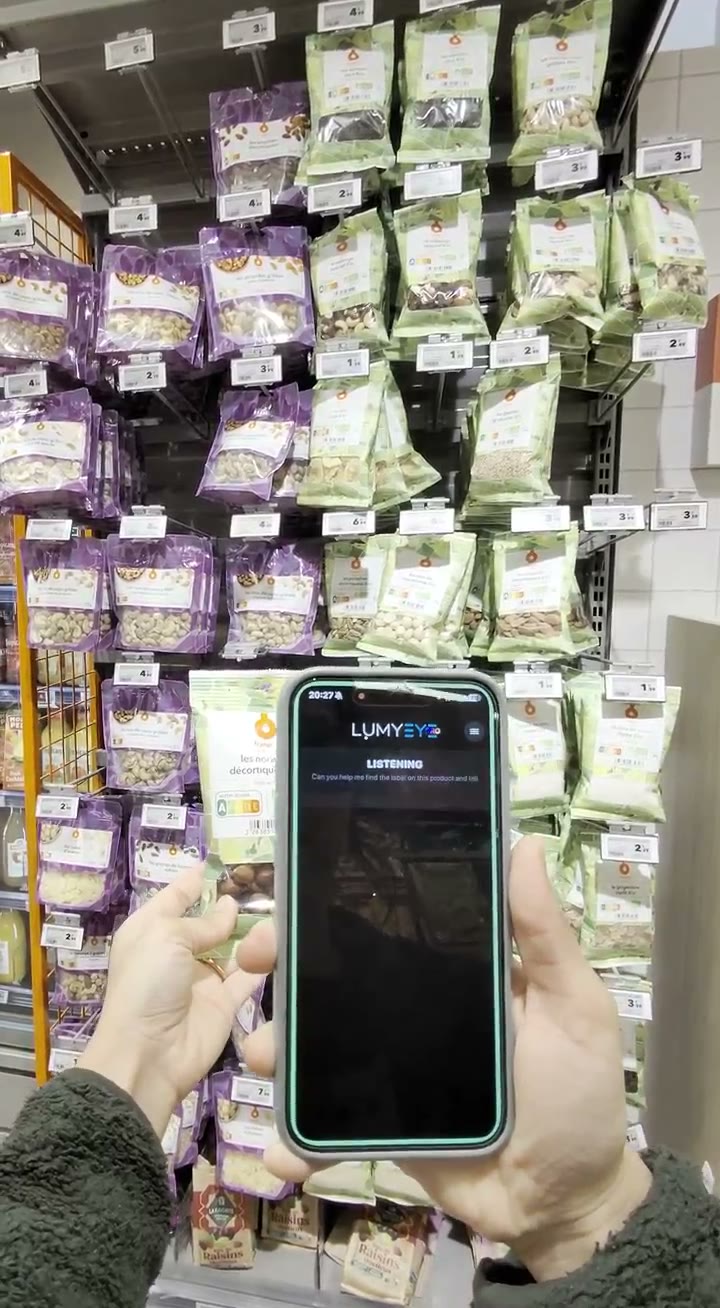
Vision Live mode. The iPhone camera streams live video to Gemini Live, which sees in real time what you're filming. Usage pattern: you hold your iPhone, you film around you (up to 360° to sweep the entire environment), the AI receives the stream live. To ask a question, you tap or double-tap anywhere on the screen; listening starts, you speak, the AI answers. At the end of the response, the app goes back to sleep automatically; a new tap or double-tap also interrupts a response in progress.

Example: user walking in a pedestrian street, films the street, double-taps then asks "What's in front of me?". Answer: "A bakery window on your right, a public bench on your left and a newsstand about thirty meters ahead."

The video stream is continuous and streamed in real time to the AI, but no answer is emitted without a question: there is no automatic description. You can chain questions on the live stream: "read this shop window", "what's the street number?", "is there a bus stop nearby?". Vision Live recognizes shop windows, street furniture (benches, newsstands, trash cans), construction signs, directional signs, street numbers, business names — but only on your request.

Vision Live is a visual assistant; it does not replace the white cane, guide dog or human alertness. It must not be used to decide when to cross a street. Particularly useful for users with retinitis pigmentosa (tunnel vision) or glaucoma (reduced visual field) who need to compensate for the loss of peripheral vision. iPhone 16+, $16.99/month. The flagship feature that justifies the Pro edition on its own.
Frequently asked questions

About Vision Live on a walk.

How does Vision Live work exactly?

You hold your iPhone, you film around you (up to 360 degrees if you want to sweep the entire environment), Lumyeye Pro accumulates the visual context. To ask a question, you tap or double-tap anywhere on the screen: "What's in front of me?", "read this sign", "is there a bench nearby?". Lumyeye Pro answers from what it has seen, and at the end of the response goes back to sleep. Q&A streaming on live video, no continuous narration.

Do I need to create an account to try Vision Live?

No. Unlike Lumyeye Classic, Lumyeye Pro can be tested without creating an account: download, launch, instant. A voice onboarding at first launch explains Vision Live. Email is only requested at first payment, after the 40 free queries.

What's the battery life with Vision Live?

On iPhone 16 Pro: about 2h45 of active Vision Live session. On iPhone 16: 2h15. With Ray-Ban Meta glasses (coming soon) paired as visual relay: up to 4h. Eco mode available for long outings.

Does Vision Live work with Ray-Ban Meta glasses?

Coming soon. Compatibility with Ray-Ban Meta (integrated camera) in relay mode is in preparation. The principle: you keep the iPhone in your pocket, the glasses capture the environment, you ask your voice questions and the answer comes out through the glasses' earpiece or your AirPods.

What are the best outdoor use cases?

Urban walking (film the street then ask "read this shop window", "what's the name of this store"), rural (film the sign then ask "read this sign", "which bus stop is it"), train stations (film the display then ask "which platform for Lyon"), shopping malls (film the sign then ask "which store is it"). Lumyeye Pro is a visual assistant complementary to the white cane and guide dog; it does not replace them and must never be used to decide when to cross a street.

How do I activate listening to ask a question?

You tap or double-tap anywhere on the screen. No wake phrase to memorize, no button to aim at — useful when your hands are holding the iPhone to frame the scene. At the end of the response, the app goes back to sleep automatically. A new tap also interrupts a response in progress if you want to rephrase.

Testimonial

Fatima, 36, Marseille.

"Vision Live changed my life. I live alone in Marseille, I go out every day for physical therapy. Before, I waited for a neighbor to walk me to the bus. Now Lumyeye Pro describes what's around when I ask: 'bakery window on the right', 'public bench on your left', 'bus stop with the 22 in 30 meters'. With my cane, I'm free."

— Fatima, 36, Marseille, retinitis pigmentosa

Practical tips

Get the most out of Vision Live.

  1. Pair with Ray-Ban Meta for long walks. Ray-Ban Meta glasses free your hands, capture at eye level, and offload some of the iPhone battery. For trips over 30 minutes, the winning combo. Vision Live + Ray-Ban Meta = 4h of battery life. Coming soon.
  2. Enable eco mode for long outings. "Eco" Vision Live reduces analysis frequency to 1 image per second instead of 3. You lose responsiveness but gain 40% battery. Recommended for park walks or museum visits.
  3. Distinguish urban and rural walking. In the city: "describe the environment around me" to spot shop windows, furniture, signs. In the country: "read the signs". Lumyeye Pro adapts the description to the requested context. Assistant only, never used to decide to cross.
  4. Stay in control of your travel. Vision Live is an assistant, not an automatic guide. Cross-check its indications with your cane, your guide dog, and your own judgment. No AI replaces the expertise of an O&M instructor.
  5. Ask focused questions. "What's the street number?" or "read this sign" works better than open-ended "describe everything". Focused questions = fast accurate answers.

Try Lumyeye Pro.

Lumyeye Pro on iPhone 16+, from $16.99/month. Free trial, no credit card.

Download Lumyeye See all demos

Direct download

Try Lumyeye Pro in 1 tap.

40 free queries · no credit card · no account required.

Download on the App Store →